
Setup environment to decode and manipulate Thrift traffic
Once upon a time, we were asked to pentest an API and received… JAR file with a client certificate for mTLS. Not your typical Swagger + token setup.
A quick look under the hood showed that the API wasn’t REST or SOAP - it was using Apache Thrift with a binary protocol.
Apache Thrift in a nutshell
Unlike REST or GraphQL, Thrift is a cross-language RPC framework that relies on an interface definition language to generate platform specific code. Communication happens over a compact binary protocol, which is great for performance, but not so great for interception and manual analysis. Coupled with Mutual TLS (mTLS) presents a significant hurdle for standard interception workflow.
This article outlines a practical approach to establishing a transparent proxy setup using Nginx, Burp Suite and Java wrapper to decode and manipulate Thrift traffic.
Preparing the environment
The idea is straightforward:
Client -> Nginx (mTLS) -> Burp -> Real API (mTLS)
We terminate the client-side mTLS at Nginx, forward traffic to Burp for inspection, and then let Burp handle communication with the real API.
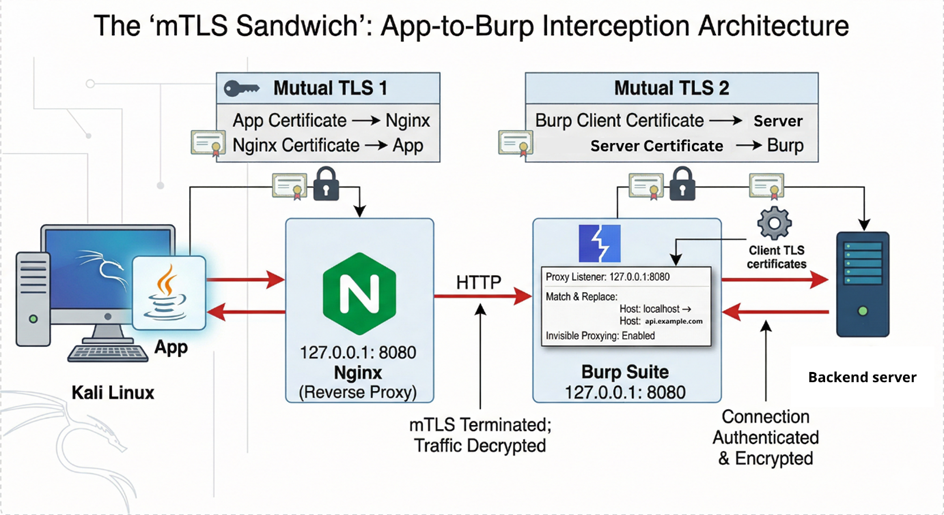
Step 1 – Generate a Java Keystore
To make the client trust our local proxy, we need a proper keystore:
# Generate Client Private Key
openssl req -new -key client.key -out client.csr -subj "/CN=TestingClient"

# Sign Client Certificate with the engagement's CA
openssl x509 -req -in client.csr -CA MyCA.pem -CAkey MyCA.key -CAserial MyCA.srl -out client.crt -days 365 -sha256

# Bundle into PKCS12 format
openssl pkcs12 -export -in client.crt -inkey client.key -name "clientcert" -out client.p12

# Convert PKCS12 to JKS for the Java Client
keytool -importkeystore -srckeystore client.p12 -srcstoretype PKCS12 -destkeystore client.jks -deststoretype JKS
Step 2 – Nginx as an mTLS bridge
Nginx handles the client authentication and forwards everything to Burp:
server {
    listen 8443 ssl;
    server_name localhost;

    # Nginx Identity (Server Certificate)
    ssl_certificate      /path/to/nginx.crt;
    ssl_certificate_key  /path/to/nginx.key;

    # mTLS Configuration (Mandatory Client Verification)
    ssl_client_certificate /path/to/MyCA.pem;
    ssl_verify_client      on;

    location / {
        proxy_pass http://127.0.0.1:8080;     # Forward to Burp Suite Proxy
        proxy_set_header Host $host;
        proxy_set_header X-Real-IP $remote_addr;
    }
}
Step 3 - Java wrapper for the Thrift client
With the JAR file provided, we write a small Java wrapper. This code initializes the Thrift client, points it at our local Nginx instance and injects the JKS for the mTLS handshake.
public class ThriftTestWrapper {
    public static void main(String[] args) {
        // Configuration Parameters
        String hostUrl = "localhost";
        int hostPort = 8443;
        String keystorePath = "client.jks";
        String keystorePassword = "password";

        // Initialize the Thrift client with SSL/TLS capabilities
        // The API.https method typically wraps TSSLTransportFactory
        Client client = API.https(
                hostUrl,
                hostPort,
                keystorePath,
                keystorePassword
        );

        // Execute API methods to generate traffic
        client.getData(fromDate, toDate);
    }
}
This forces the client to talk to our local Nginx instead of the real backend.
Step 4 – Burp configuration
Once the environment is live, configure Burp Suite:
- Enable “Support invisible proxy” in the Proxy Listener settings to handle non-proxy Thrift client.
- Forward all requests from Nginx to the actual API endpoint with upstream proxy.
- Import the client certificate into Burp, so it can authenticate against the real server.
Testing
Here’s where things get interesting.
Thrift uses a strict binary format:
- Strings are often visible in cleartext
- Surrounding bytes define filed IDs, types and lengths
This means:
- You can manually fuzz values like integers or date strings
- But if you mess with fields without updating metadata, serialization breaks
Example request looks like this:
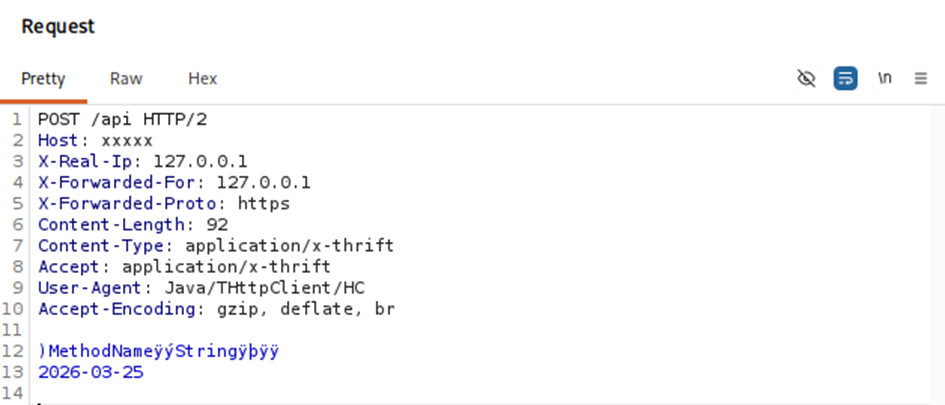
Here you can see strings with surrounding bytes.
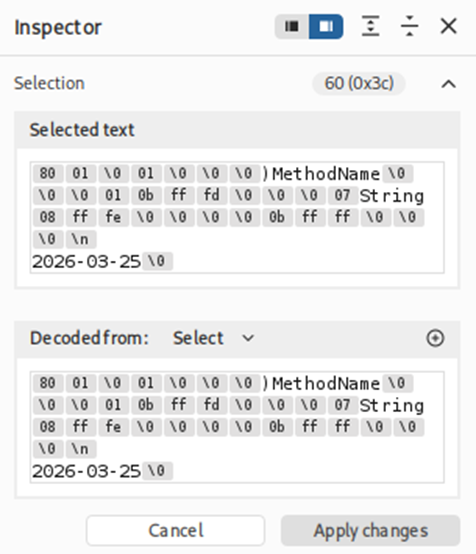
For anything more complex than trivial payloads, you can use Thrift Decoder Burp Extension (https://github.com/mdsecresearch/ThriftDecoder).
Considerations
The same approach can be used during pentesting thick clients with mTLS.